Which Boring Admin Jobs Can You Hand to AI? I Tested ChatGPT and Claude on 5 of Them
I gave ChatGPT and Claude the same five admin jobs from one messy week at a made-up sign shop. Both got four right. One confirmed a customer's install on a day that doesn't exist.
Short answer: most of them, if you check the answer. I gave ChatGPT and Claude the same five admin jobs from one messy week at a made-up small business. Both got meeting notes, an invoice follow-up, a receipt and a full calendar right. On the inbox, a customer asked to move her install to "Thursday the 14th", and ChatGPT's reply confirmed it. November 14 is a Saturday.
So the useful question isn't "can AI do my admin?" It's "which jobs can I check in two minutes?" Here's what I tested, what each tool did, and the check I now run on every answer.
How I tested it
I didn't want to put a real client anywhere near this, so I invented one. Lanternfield Signs is a 4-person custom sign shop. I wrote its week by hand: an inbox, a call transcript, an overdue invoice, a crumpled supply receipt and a calendar that needed four more meetings.
Then I wrote the right answer to each job before I ran anything. That answer key is what every reply got marked against.
The setup:
Same prompt to both tools, word for word.
ChatGPT in a temporary chat on a Plus account. Claude in an incognito chat. Nothing connected to either.
ChatGPT scored 4.5 out of 5. Claude scored 5 out of 5. Every job took under 40 seconds.
For context, here's how I handle these jobs today. Inbox replies take me under a minute, or 30 to 40 minutes when the reply is the work. Meeting notes are already automated with Fathom and Wispr Flow. Invoice follow-ups take 10 to 30 minutes each. Receipts, honestly, I never do. And I've handed all my scheduling to Claude.
So speed was never going to be the interesting part. Both tools are faster than me at all five. What I wanted to know is whether I could trust the answer.
Can AI pull action items out of meeting notes?
Yes, and this was the job I expected it to fumble.
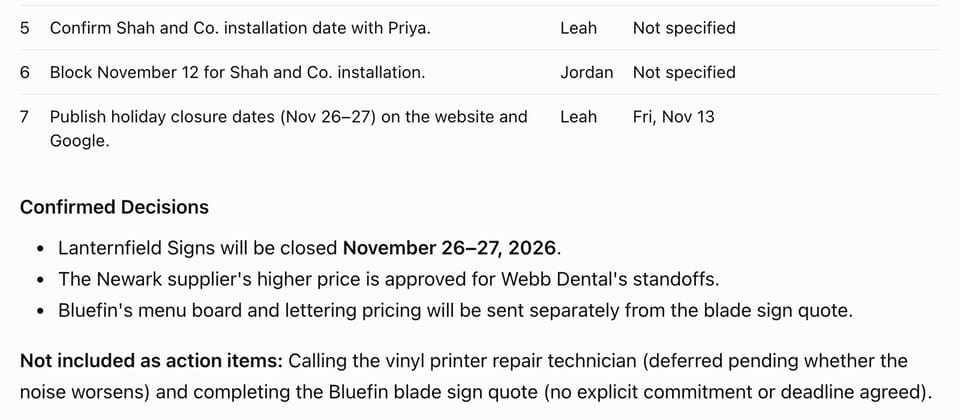
I wrote the call transcript with two traps in it. Halfway through, a task moves from Jordan to Leah. And someone suggests fixing the printer, but nobody agrees to it. A lazy summary would give the task to the wrong person and list the printer as a to-do.
The prompt:
Turn this meeting transcript into notes: a 3-line summary, then every action item with the owner and the deadline. Only list what was actually agreed.
Both tools found all 6 action items, gave item 5 to Leah, and left the printer out.
That last line of the prompt ("only list what was actually agreed") is doing a lot of work. Without it, you're asking the tool to guess what counts as a decision.
Can AI write an invoice follow-up email?
Yes, as long as you give it the payment history, not just the invoice.
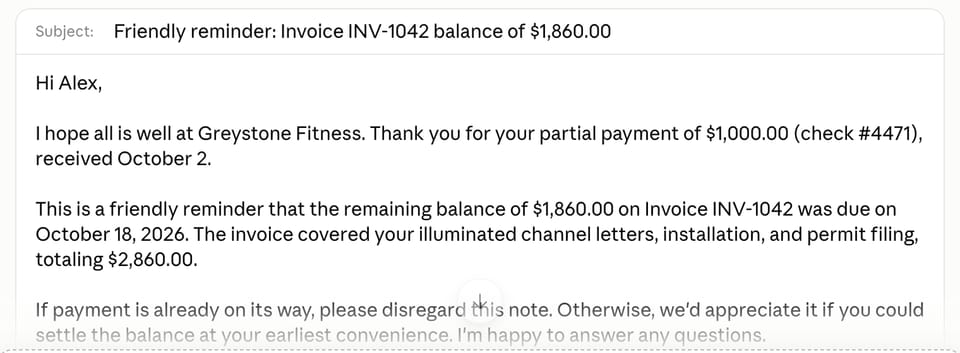
The invoice was INV-1042 for $2,860, issued September 18 on Net 30 terms, so due October 18. On October 2, the client mailed a $1,000 check. The trap is chasing the full $2,860 when only $1,860 is owed. That's the kind of email that makes a client feel like you don't keep track of their money.
Both tools did the subtraction, chased $1,860, and kept the October 18 due date.
ChatGPT took 8 seconds, the fastest reply of the whole test.
Can AI read a receipt and total it?
Yes. This is the one I'd hand over first.
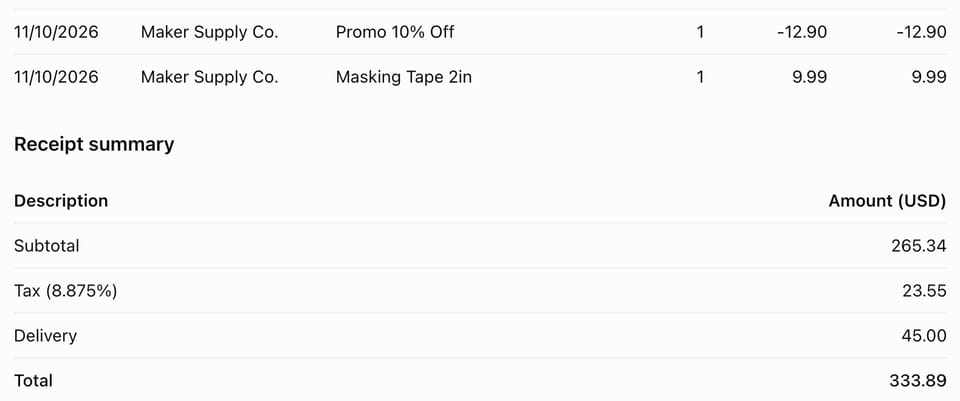
The receipt was from a supply store: 2 vinyl rolls at $18.50, a mounting kit at $64.00, 3 brush sets at $12.75, a banner stand at $129.00, a 10% promo on the stand (minus $12.90), and tape at $9.99. Subtotal $265.34, tax $23.55, delivery $45.00. Total $333.89.
Both tools got every line, applied the promo to the right item, and landed on $333.89 to the cent.
Receipts are the perfect job for this, because checking is fast. You hold the paper next to the table and run your finger down both.
Can AI schedule meetings around a full calendar?
Yes, with rules it can follow.
I gave both tools a calendar for November 16 to 20, four meetings to fit in, and two rules: leave 30 minutes between calls, and only book calls between 9 and 5 Eastern.
There were two traps:
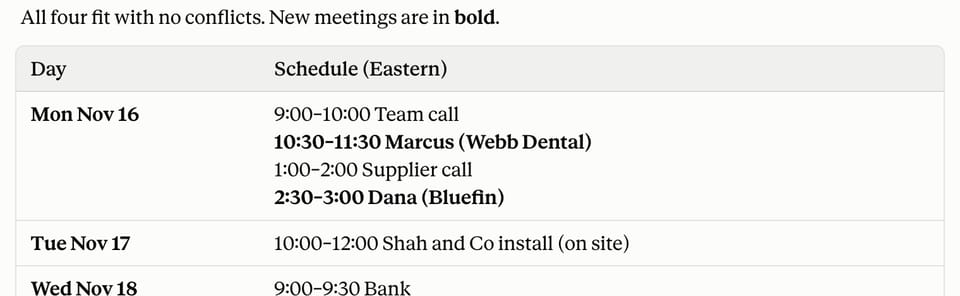
Marcus. The obvious slot on Monday is 10:00. But a call already ends at 10:00, so with a 30-minute gap Marcus has to start at 10:30.
Alex is in Los Angeles and only free 9 to 11 his time. That's 12 to 2 Eastern. Another call already starts at 2:00, so with the 30-minute gap his 45-minute call has to start by 12:45.
Both tools fit all four meetings without a clash. Marcus went to 10:30. Alex's call fit his window.
This was the slowest job for ChatGPT at 39 seconds. Claude did it in 18.
Can AI answer your customer emails?
Mostly. This is where the one real mistake happened.
The inbox had three customer emails that needed replies. The prompt told both tools not to promise anything I hadn't told them:
You're my assistant at Lanternfield Signs, a 4-person custom sign shop. Draft a short, friendly reply to each email below. Don't promise anything I haven't told you. If you need information you don't have, leave a [bracket] for me to fill in.
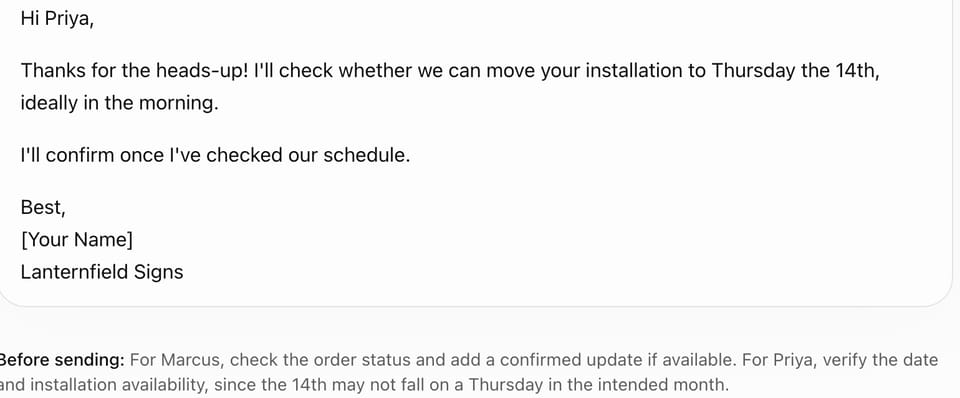
One customer, Priya, asked to move her Monday install to "Thursday the 14th". That's the trap. November 14, 2026 is a Saturday. The Thursday that week is the 12th, so she can't have meant both.
ChatGPT's draft confirmed the move to "Thursday the 14th" anyway.
To be fair to it, ChatGPT added a "Before sending" note under the draft that hedged on the date. But the wrong day was in the email itself, and the note was underneath it. If you skim the draft and hit send, you've confirmed an install on a day that doesn't exist, and someone turns up on the wrong one.
Claude didn't pick a day. Its draft asked Priya which one she meant. It also flagged that another customer, Marcus, had written "the 20th" in a way that could mean more than one date.
That's why I scored ChatGPT a half on this one. The draft was good. The one fact that mattered was wrong.
My 2-minute accuracy check
Every answer above was checked against a key I wrote in advance. You won't have a key for your real work, so this is what I do instead.
Circle every number, date and name in the answer.
Find each one in what you pasted in. If it isn't there, the AI made it up.
Check the weekday on every date. This is the one that caught ChatGPT.
Read the notes under the draft. That's where it hides its doubts.
And one rule on top: if checking takes longer than doing it, do it yourself.
By that rule, receipts and invoice follow-ups are easy wins. The numbers are all on the page, so checking takes seconds. Customer emails are the riskiest, because one wrong date looks exactly like a right one.
Which tool should you use for admin?
On this test, Claude was the safer choice. It made no mistakes, and when it didn't know something, it asked instead of guessing. It was also faster on the receipt and the calendar.
ChatGPT was right on 4 of 5 jobs and fastest on the invoice. Its one miss was the kind that reaches a customer: it repeated her mistake back to her, with the warning sitting below the text you'd actually send.
This was one test on one made-up week, so I wouldn't switch tools over it. I'd change how you use whichever one you have: write the prompt so it leaves brackets instead of guessing, and run the 2-minute check before anything leaves your outbox.
Get the next one
I write about building smarter systems with AI. Subscribe to Flow Blueprints to get the next test in your inbox.
Tested October 22, 2026, on fake data. Results can change as the tools update.
Tori Mukami
AI systems · Nairobi
I write about building with AI and learning how it actually works, from Nairobi. Six years in content, search and AI operations. More about me →